- Developer
- ArenaNet
- Installs
- 100K+
- Downloads
- 0
- Views
- 3
- Updated
- Oct 15, 2026
Screenshots
About Guild Wars Reforged on Android: Free vs Paid & Install Guide
Guild Wars Reforged on Android: what the free Prophecies download includes, campaign prices, cross-play and account rules, known issues and how to install.
Guild Wars Reforged on Android: What's Free, What Costs Extra and How to Install
Guild Wars Reforged is ArenaNet's remastered version of the original Guild Wars, a 2005 online role-playing game, and it is now playable on Android through Google Play. The download is free and ad-supported, but only the Prophecies campaign is included. Factions, Nightfall and other content are paid, and some features are locked until you buy something or log in with an account that already owns the game.
This guide explains what the mobile version includes, how cross-play and accounts work, which Android problems ArenaNet has acknowledged, and how to install it from the right source. Details were checked on October 15, 2026. Prices come from ArenaNet's launch announcements and may differ by region.
Guild Wars Reforged mobile at a glance
| Detail | Information |
|---|---|
| Game | Guild Wars Reforged (Guild Wars, mobile edition) |
| Publisher | ArenaNet |
| Platforms | Android (Google Play), iOS (App Store) and PC |
| Android package ID | net.arena.guildwars.reforged (as reported by a gaming news site) |
| Mobile launch | June 24, 2026 per several outlets; a soft launch in four countries began May 19, 2026 |
| Price | Free download with ads; paid options listed below |
| Internet | Online game; it uses the same servers as the PC version |
| Android version, size, current version number | Not confirmed. Check the Google Play listing for your device. |
I could not open the live Google Play page while preparing this guide, so the table does not include the version number, file size or Android requirement. ArenaNet's help center links to a separate system requirements article that I could not read, so check there too.
What is free and what is not
This is the question most readers need answered first, and the store-style description of the game does not make it clear. The free mobile client includes the Prophecies campaign. According to ArenaNet's mobile FAQ, free accounts see ads when moving between maps and missions, and cannot use chat or PvP. Other outlets also report that player trading is restricted on the free version.
Paid options reported at launch (US prices from ArenaNet's announcement):
- Removing the Prophecies ads: $6.99, one time.
- Factions campaign: $6.99.
- Nightfall campaign: $6.99.
- Eye of the North expansion: $9.99.
- Bonus Mission Pack: $5.99.
The FAQ adds that buying game packages removes the restrictions and ads, and that skins, bank expansions and extra character slots are sold separately. If you already own Guild Wars Reforged and log in with your ArenaNet account, you get your purchases and characters on mobile without ads or further cost.
That means the "complete saga" from Ascalon to Nightfall is not part of the free download. Plan on paying for Factions and Nightfall if you want all three campaigns.
Cross-play, accounts and progress
Mobile and PC share the same servers, so players on both can meet, group up and play in the same world. You log in with an ArenaNet account to use existing characters.
Accounts are the part to read carefully before buying anything.
- If you start on mobile, you buy content with a Mobile ID. You can connect that ID to an email address to log in on other platforms.
- To play on PC, the FAQ says your mobile account must be linked to an ArenaNet login and have a paid campaign. Only characters on paid campaigns are playable on PC.
- Steam linking has changed. At launch, reports said a mobile ID could not be linked to Steam, and one German outlet advised Steam owners to buy on Steam first. ArenaNet's FAQ says a July 21, 2026 update added Steam login. Read the current FAQ before deciding.
- Serial keys can be redeemed on Android under Edit Account, then Manage Access Keys, on the character select screen. iOS cannot redeem keys.
Controls and how it plays
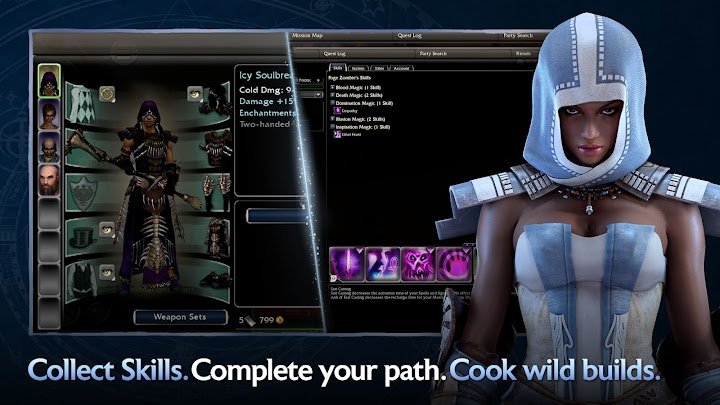
ArenaNet says the mobile interface and controls were redesigned for phones and tablets, and that controller support matches the PC version. Two independent writers who tried it describe a virtual movement stick on the left, tap-to-move, and skill buttons on the right.
Their opinions are mixed, and each is one person's experience. One found play smooth but the skill drawer awkward and battery drain fast. Another reported dropped frames on a mid-range phone in large late-game fights and busy outposts, and clumsier targeting and PvP against PC players. Both rated it best for short, casual sessions, with PC still better for demanding content.
I did not play the game, so this guide cannot confirm how it performs on your phone.
Known Android issues
ArenaNet's mobile Known Issues page, which lists no dates, includes these items relevant to Android:
- Some Android devices that should run the game are shown as incompatible and blocked from the Play Store. ArenaNet says it is monitoring reports and points players to a device list on the official wiki.
- The game may crash during play, and may keep crashing when you log back in after selecting a character.
- Anti-aliasing is not available in the mobile graphics options.
- Serial keys are described inconsistently. The FAQ says Android users can redeem them, while the Known Issues page says keys cannot be redeemed on mobile for accounts created on PC and points to the PC client. Try the PC client if the mobile option fails.
The page also lists fixed problems, including an Android 12 display bug, so an older report you read may already be outdated. Check the current page before troubleshooting.
How to install Guild Wars Reforged from Google Play
- Open the Guild Wars Reforged listing on Google Play on your Android device, or search for the name in the Play Store app.
- Confirm the publisher is ArenaNet and the web address contains
id=net.arena.guildwars.reforged. - If the Install button is missing or says your device is incompatible, see the Known Issues note above before assuming your phone is too old.
- Tap Install and open the game.
- Choose to play free with ads, or log in with an ArenaNet account that already owns the game.
Some regions are restricted, according to the FAQ, which links to a separate list. If the game is not offered where you live, do not install an APK from another site to get around it.
To update, use the Play Store's app management screen or leave automatic updates on. Do not turn off Google Play Protect to force an installation.
Why you should avoid APK files from other sites
This guide did not verify any APK for the game, and a file name cannot prove who built a file. An unofficial copy could contain unwanted software. It also cannot be guaranteed to connect to ArenaNet's servers or to your account. Since the free version needs no payment, there is little reason to look elsewhere.
Who should install it
It may suit you if you already own Guild Wars Reforged and want to play on a phone, or you want a free way to try the first campaign in short sessions.
You may prefer the PC version if you plan to play for hours, want full interface customization, or care about competitive PvP, where two reviewers found mobile controls slower. If you are weighing a purchase, remember that campaign content costs extra and account linking rules matter.
More games are listed in the Games section of this site.
Frequently asked questions
Is Guild Wars Reforged free on Android?
The download is free and includes the Prophecies campaign with ads. Removing ads and adding Factions, Nightfall or Eye of the North costs extra.
Can I play with PC players?
Yes. Mobile and PC use the same servers. To play on PC with a mobile-created account, the account must be linked to an ArenaNet login and have a paid campaign.
Do I need to buy the game again if I own it on PC?
No. ArenaNet says owners can log in with their ArenaNet account on mobile and keep their purchases and characters at no extra cost. Steam accounts were handled differently at launch, so check the FAQ.
Why can't I install it on my phone?
ArenaNet lists a known issue in which some capable Android devices are marked incompatible. Other possible causes include an out-of-date Play Store or a restricted region.
What Android version does it need?
I could not confirm this. ArenaNet links to a system requirements article, and Google Play shows compatibility for your device.
Does it work offline?
No offline mode was described in the sources I read. The game uses the same servers as the PC version, so expect to need a connection.
Can I use the same account on iPhone and Android?
The FAQ describes logging in with an ArenaNet account across platforms. iOS accounts and purchases follow Apple's store rules, so read the FAQ before buying on either platform.
Is it safe to download from other websites?
This guide does not recommend it. Use the Google Play listing.
Bottom line
Guild Wars Reforged on Android is a genuine port of a long-running online game, free to try but built around paid campaigns. Before spending money, read ArenaNet's mobile FAQ on accounts and Steam linking, and expect it to suit short sessions better than long ones.
Disclaimer: AppGameGuide is an independent app-information website. Guild Wars and Guild Wars Reforged are products of ArenaNet, LLC. This article is not affiliated with or endorsed by ArenaNet. All trademarks belong to their respective owners. Details were checked on October 15, 2026 and may change.
⬇ Download Guild Wars Reforged on Android: Free vs Paid & Install Guide